
Every small and medium business owner knows the pain: you start your day with 47 unread emails, spend two hours trying to catch up, and somehow end the day with 63 more. Email management has become the silent productivity killer that's stealing your focus from revenue-generating activities.
But what if your inbox could work for you instead of against you? AI email management isn't just for Fortune 500 companies anymore. Smart SMBs are leveraging AI Email Manager Services to automate email triage, generate intelligent replies, and reclaim up to 15 hours per week of valuable time.
Here's your complete playbook for implementing AI email automation that actually delivers results.
The Hidden Cost of Manual Email Management
Before diving into solutions, let's quantify the problem. The average SMB employee spends 2.6 hours daily managing emails: that's 13 hours per week or 676 hours annually per person. For a small team of five, you're looking at 3,380 hours of email management time each year.
At an average hourly rate of $25, that's $84,500 in annual labor costs just for email management. And this doesn't account for the opportunity cost of delayed responses, missed leads, or the mental fatigue that comes from constant inbox monitoring.

The Foundation: AI-Powered Email Triage System
The biggest mistake SMBs make when implementing AI email automation is trying to automate everything at once. Instead, start with a layered triage system that handles the obvious first, then uses AI for the complex cases.
Layer 1: Rule-Based Filtering
Begin by setting up deterministic rules that catch straightforward emails:
- Vendor invoices go to accounting
- Support requests route to customer service
- Sales inquiries flag for immediate attention
- Internal communications stay in team channels
This handles approximately 40-50% of your incoming emails without requiring AI intervention.
Layer 2: AI Intent Classification
For emails that don't fit clear rules, deploy an AI system that analyzes:
- Intent recognition: Is this a sales inquiry, support request, or information request?
- Urgency assessment: Does this need immediate attention or can it wait?
- Required action: Should this be forwarded, replied to, or escalated?
- Key metadata extraction: Order numbers, dates, contact information
This intelligent classification system ensures nothing falls through the cracks while routing messages to the right person with proper context.
Smart Reply Generation That Maintains Your Brand Voice
Once your emails are properly sorted, the next step is automating responses. But here's the key: start with draft generation, not auto-sending.
Template-Based AI Responses
Create response templates for common scenarios:
- New lead inquiries: "Thank you for your interest in [service]. Based on your needs, I'd recommend scheduling a brief consultation to discuss how we can help. Here's a link to my calendar…"
- Order status requests: "Thanks for reaching out about your order #[number]. I've checked the status and can confirm…"
- Support escalations: "I understand your frustration with [issue]. Let me connect you with our specialist who can resolve this immediately…"
Your AI system generates personalized drafts using these templates, maintaining consistency while adapting to specific customer contexts.

Quality Control Process
Implement a review workflow where:
- AI generates draft responses
- Team members review and approve before sending
- System learns from edits and improvements
- Confidence thresholds determine when auto-send is appropriate
This approach builds trust gradually while maintaining quality control.
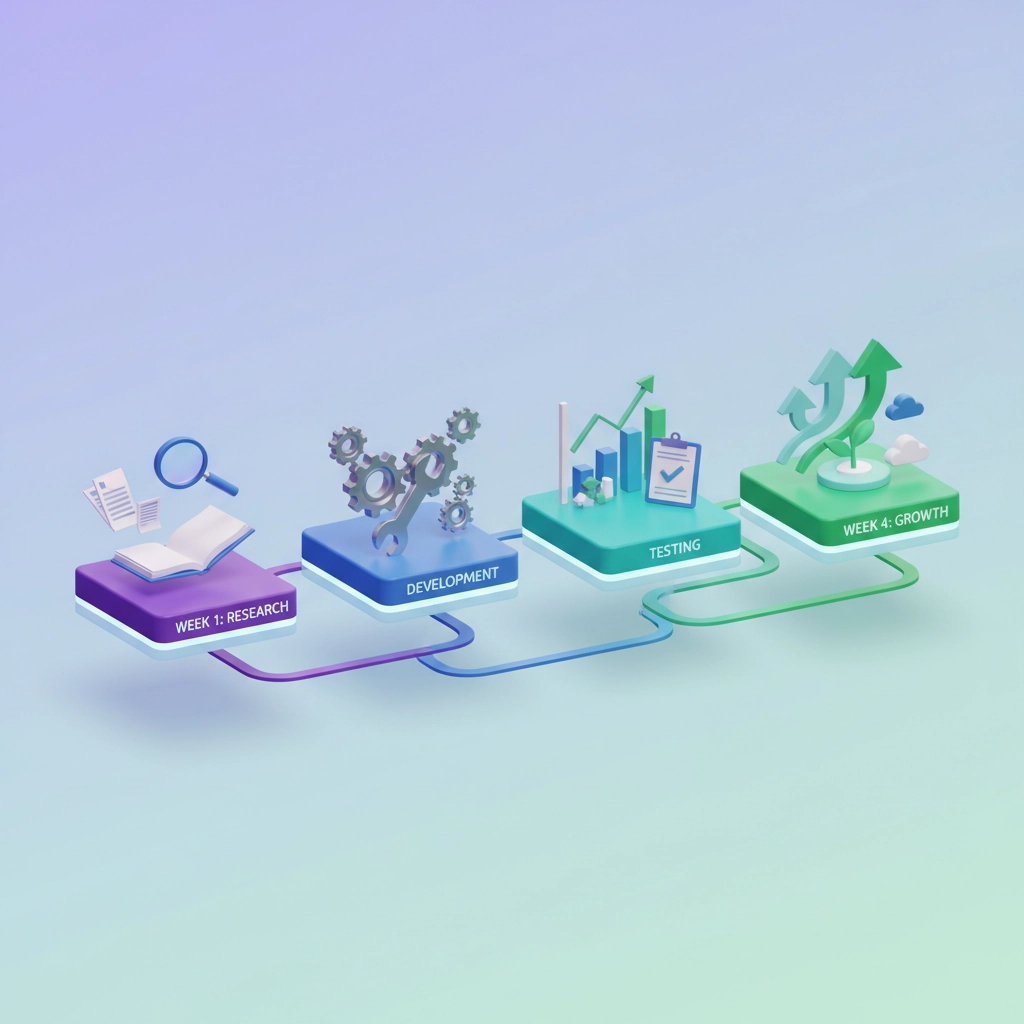
Your 4-Week Implementation Roadmap
Week 1: Audit and Map Your Email Ecosystem
Document every type of email your business receives. Create categories and identify:
- Current response times
- Who typically handles each type
- Standard responses you currently use
- Compliance requirements for different message types
Week 2: Set Up Basic Automation
Start with one email category: typically sales inquiries work best for initial implementation. Configure:
- Email forwarding rules
- Basic intent detection
- Draft reply generation for review
- Simple escalation triggers
Week 3: Test and Refine
Run your system in pilot mode:
- Monitor all automated actions
- Track accuracy of intent detection
- Refine prompts based on results
- Train your team on the review process
Week 4: Expand and Optimize
Based on Week 3 results:
- Add additional email categories
- Increase automation confidence levels
- Implement send-time optimization
- Set up comprehensive reporting

Choosing the Right AI Email Management Platform
Not all email automation tools are created equal. Here's what to look for:
Essential Features:
- Multi-channel integration: Email, chat, SMS, and social media
- CRM connectivity: Seamless data flow between systems
- Customizable workflows: Adapt to your specific business processes
- Analytics and reporting: Track performance and ROI
- Security and compliance: Protect sensitive customer data
Advanced Capabilities:
- Predictive analytics: Optimize send times based on recipient behavior
- Sentiment analysis: Identify urgent or frustrated customers
- Lead scoring: Prioritize high-value prospects automatically
- Multi-language support: Handle international customers
Measuring Success: KPIs That Matter
Track these metrics to quantify your AI email management ROI:
Efficiency Metrics:
- Response time reduction: From hours to minutes
- Email volume processed: Percentage handled without human intervention
- Time savings per employee: Hours reclaimed weekly
- Queue reduction: Fewer emails sitting in pending status
Business Impact Metrics:
- Lead response improvement: Faster qualification and follow-up
- Customer satisfaction scores: Improved service quality ratings
- Revenue attribution: Sales generated from automated nurture sequences
- Cost per resolved inquiry: Reduced operational expenses
Most SMBs see 40-60% reduction in email management time within the first month, with some achieving up to 75% efficiency gains after full implementation.
Why Partner with Virtual Nexgen Solutions for Your AI Email Automation
Implementing AI Email Manager Services requires more than just buying software: it needs strategic planning, custom configuration, and ongoing optimization. At Virtual Nexgen Solutions, we specialize in helping SMBs automate your business with AI while maintaining the personal touch your customers expect.
Our AI email management solutions include:
- Custom workflow design tailored to your specific business processes
- Seamless integration with your existing CRM and communication tools
- Brand voice training to ensure AI-generated responses match your company style
- Ongoing optimization based on performance data and changing business needs
- Compliance management for industries with strict communication requirements
We've helped businesses across industries reduce email management overhead by an average of 12 hours per week while improving customer response satisfaction by 35%.
Getting Started with Your AI Email Transformation
The key to successful AI email automation isn't perfection from day one: it's starting smart and scaling strategically. Begin with one high-impact email category, prove the value, then expand systematically.
Don't let email management continue stealing time from growing your business. The SMBs that implement AI email automation now will have a significant competitive advantage as customer expectations for instant, personalized communication continue to rise.
Ready to reclaim your time and transform your email management? Book a free 30-minute consultation with our AI automation experts at Virtual Nexgen Solutions to discuss your specific needs and create a custom implementation plan.
Schedule your free consultation here and discover how AI Email Manager Services can save you hours every week while improving customer satisfaction.
The future of email management is automated, intelligent, and incredibly efficient. The only question is: will you be leading the transformation or catching up to competitors who started today?

